Privacy settings
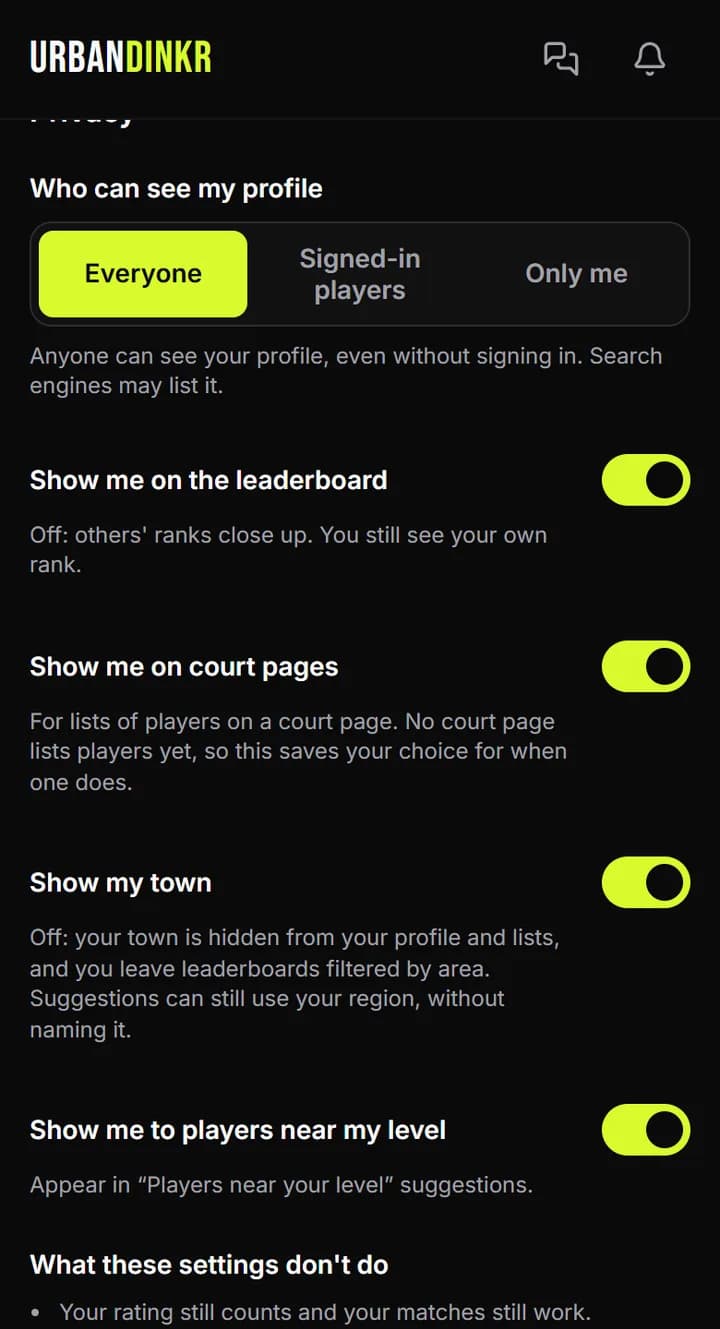
Choose who sees your profile, your rank and your town.
- 1.
Open Me and tap Edit profile. Go down to Privacy.
- 2.
Under Who can see my profile, pick Everyone, Signed-in players or Only me.
- 3.
Turn Show me on the leaderboard on or off.
- 4.
Turn Show my town on or off.
- 5.
Turn Show me to players near my level on or off.
- 6.
Tap Save changes.
What these settings don't do
Your rating still counts and your matches still work. People you played with still see your name on those matches. So do the host or organizer, and anyone who joins the same session or league, even if they leave again. If you host a session or run a league, your name shows as the host. Anyone who has your exact handle can still pick you to log a match or message you. Your profile link shows your name. Match photos you agreed to make public stay public until a player on the match makes them private. People in a chat see your name in that chat. Link previews already shared can take an hour or so to update, and other apps may keep their own copy. Admins can see everything. Hiding doesn't stop anyone blocking or reporting you, and fraud checks work the same.
Still stuck? Contact us